


Microsoft Teams Phone System Integration: The Professional SME Guide for 2026
- Simon Raine
- Jun 9
- 12 min read
With over 20 million users now relying on Microsoft's communication infrastructure, the transition to a single and unified interface has become a strategic necessity for the modern SME. You likely recognise the frustration of managing fragmented remote tools and the administrative burden of multiple telephony bills. Achieving a seamless microsoft teams phone system integration allows your business to consolidate these disparate elements into one secure and professional hub. It's a move that replaces hardware complexity with the stability of a 99.999% uptime guarantee.
We understand that the perceived complexity of Microsoft licensing and the security of cloud telephony often cause hesitation. This guide provides the clarity you need to transform your infrastructure whilst maintaining strict cost efficiency and compliance. We'll examine the primary connectivity pathways for 2026, including Operator Connect and Direct Routing, and explain how to align these with your specific operational requirements. You'll discover how to leverage professional call handling features to project a premium brand image without the traditional overheads.
Key Takeaways
Understand the distinctions between Calling Plans, Direct Routing, and Operator Connect to select the most cost effective pathway for your specific organisational needs.
Explore how a microsoft teams phone system integration allows you to retire legacy hardware whilst consolidating your communication tools into a single, secure interface.
Learn why a robust network audit and professional broadband backup lines are essential for maintaining uninterrupted, high quality voice traffic.
Recognise the importance of professional oversight to avoid licensing waste and ensure your telephony meets stringent security and compliance standards.
Discover how proactive monitoring identifies potential call quality issues before they can impact your professional reputation or client relationships.
Table of Contents
Understanding Microsoft Teams Phone System Integration for Modern SMEs
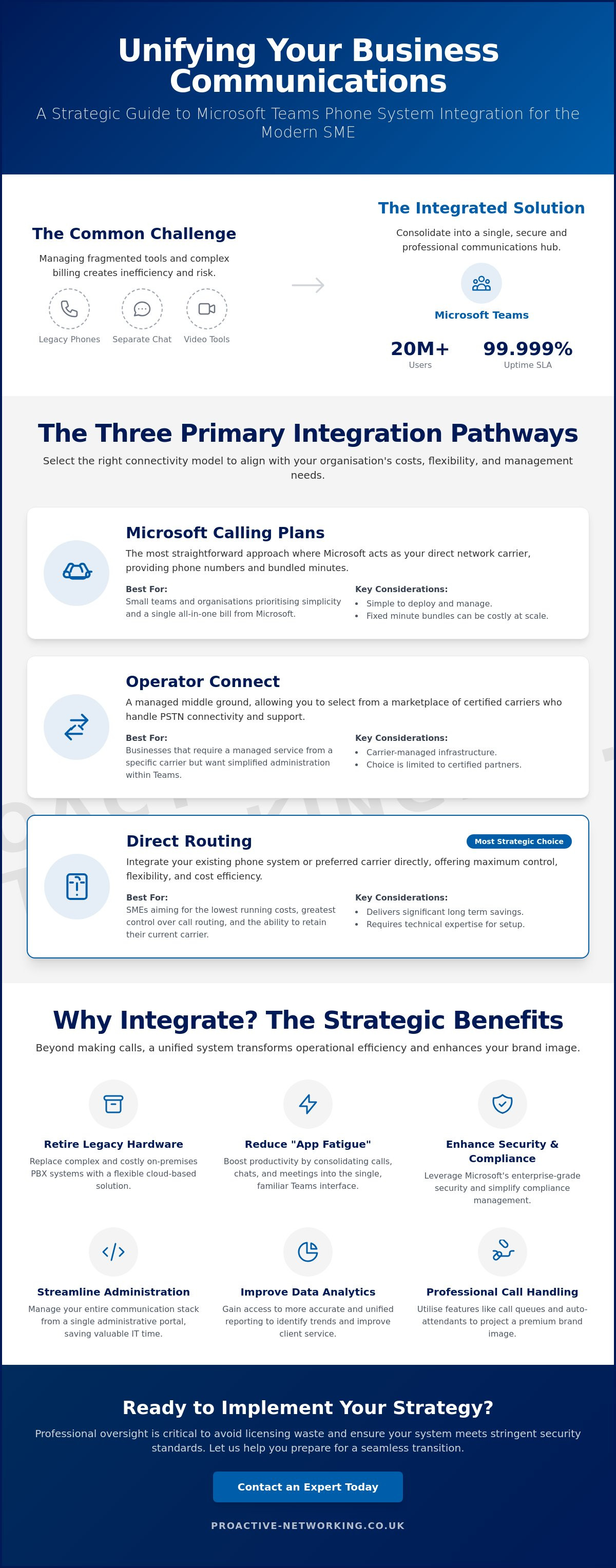
The Three Primary Integration Pathways: Calling Plans, Direct Routing and Operator Connect
Strategic Benefits: Why Integrate Your Telephony with Microsoft Teams?
Infrastructure Readiness: Preparing Your SME for a Seamless Transition
Understanding Microsoft Teams Phone System Integration for Modern SMEs
Microsoft Teams Phone represents a fundamental shift in business telephony, moving away from the rigid structures of traditional on premises hardware toward a flexible, cloud based PBX system. This transition from standard VoIP to Unified Communications as a Service (UCaaS) is no longer a luxury for the forward thinking SME; it's a requirement for operational stability in 2026. As remote and hybrid working models have matured, the limitations of disjointed legacy systems have become clear. Maintaining separate contracts for physical handsets and digital collaboration tools creates unnecessary administrative friction and security vulnerabilities that modern businesses simply cannot afford. The platform's status as a Leader in the 2025 Gartner® Magic Quadrant™ for Unified Communications as a Service confirms its reliability for the modern enterprise.
By leveraging the existing Microsoft 365 ecosystem, organisations can achieve a level of centralisation that simplifies the complex technical landscape. This isn't just about making calls; it's about embedding your communication infrastructure into the very tools your team uses for document collaboration and project management every day. A strategic microsoft teams phone system integration ensures that your telephony isn't an isolated silo, but a dependable component of your broader digital strategy.
The Core Components of a Teams Phone System
The foundation of this system is the Teams Phone licence, which provides the essential cloud PBX functionality. Once this is active, the Microsoft Teams platform acts as the unified client across all devices. Your employees can answer professional calls on their desktops, tablets, or mobiles with equal ease, maintaining a consistent corporate identity regardless of their location. Finally, the system requires PSTN connectivity to bridge the gap between your digital environment and the global telephone network. This connectivity can be established through several pathways, such as Microsoft Calling Plans or Direct Routing, ensuring your business stays connected to clients and partners worldwide.
Why Integration Surpasses Standalone VoIP
Standalone VoIP solutions often lead to "app fatigue," where staff must constantly switch between different applications to manage their daily tasks. This fragmentation doesn't just hurt productivity; it complicates IT oversight. A microsoft teams phone system integration solves this by consolidating calls, chats, and meetings into a single, familiar interface. This unified approach allows for streamlined management through one administrative portal, reducing the time your team spends on basic configuration and user onboarding. This consolidation also enhances data visibility across the organisation. With all communication occurring in one place, you gain access to more accurate reporting and analytics, helping you identify trends and improve client service standards with confidence.
The Three Primary Integration Pathways: Calling Plans, Direct Routing and Operator Connect
Selecting the correct architecture for your microsoft teams phone system integration is a pivotal decision that dictates your long term costs and operational flexibility. Microsoft provides three distinct pathways to connect your business to the Public Switched Telephone Network (PSTN). Microsoft Calling Plans offer the most straightforward approach, where Microsoft acts as your carrier. This is often an attractive starting point for smaller teams, but the fixed minute bundles can become expensive as your organisation scales. Operator Connect serves as a managed middle ground, allowing you to choose from a list of certified providers who manage the connection through a dedicated cloud to cloud interface.
For many SMEs, the most strategic choice is Direct Routing. This method allows you to integrate your existing phone system or preferred carrier directly into the Teams environment. It offers superior control over call routing and typically delivers significant savings on monthly line rentals and call charges. If you're unsure which path aligns with your current infrastructure, optimising your Microsoft 365 Licensing with professional guidance can prevent costly missteps during the transition.
Direct Routing: The Flexible Choice for UK SMEs
Direct Routing is particularly popular amongst UK businesses because it avoids the "vendor lock in" associated with native calling plans. It enables you to maintain relationships with local providers while leveraging the advanced features of the Teams client. Security is maintained through a Session Border Controller (SBC), which acts as a protective gateway for your voice traffic. These SBCs can be hosted in the cloud or on premises, ensuring that every call remains encrypted and compliant with industry standards. By utilising a third party provider, you often gain access to more competitive international calling rates and more responsive support than a global software giant can provide.
Licensing Simplified: What You Actually Need
Licensing is where many integration projects encounter unnecessary friction. To enable telephony, every user requires a Teams Phone Standard licence. If your organisation already utilises Microsoft 365 E5, this capability is included at no additional cost. However, for those on E1 or E3 plans, the "Teams Phone Standard" must be added as a separate line item. It's vital to audit your user base to ensure you aren't paying for features that staff don't require. For example, common area phones in lobbies or meeting rooms often need different, lower cost licences compared to your active sales team. A structured approach to microsoft teams phone system integration ensures your business only pays for the exact capacity it consumes.
Strategic Benefits: Why Integrate Your Telephony with Microsoft Teams?
The strategic value of a microsoft teams phone system integration extends far beyond simple convenience. For the modern SME, it provides a level of mobility that traditional PBX systems cannot match. Your staff can transition between office desks and remote environments without losing access to professional call handling features. This mobility is underpinned by a significant reduction in hardware overheads. By removing the need for physical on premises maintenance, you eliminate the recurring costs of ageing PBX units and the associated service contracts. It's a transition that replaces unpredictable repair bills with a stable, predictable monthly expenditure.
Business continuity is another critical advantage of this unified approach. By centralising your communication infrastructure, you ensure that your business remains reachable even during local service disruptions. Because the system resides in the cloud, calls can be instantly rerouted to mobile devices or alternative locations without any manual intervention. Understanding your Microsoft Teams PSTN connectivity options is the first step toward building this level of organisational resilience. It ensures that your voice services are as dependable as your data services, creating a cohesive environment for your entire team.
Security and Compliance Advantages
Aligning your telephony with Cyber Essentials and ISO 27001 standards is a critical requirement for firms in the legal and finance sectors. Microsoft’s multi layered security architecture ensures that call data is protected with the same rigour as your sensitive documents. This creates a highly secure environment when combined with managed email security services, providing a unified shield against sophisticated phishing or social engineering attacks. By integrating your phone system, you ensure that all communication metadata is captured within your existing compliance framework, simplifying audits and data protection tasks. It's a protective measure that safeguards your professional reputation whilst meeting strict regulatory demands.
Operational Efficiency and Professionalism
A microsoft teams phone system integration allows even small teams to present a sophisticated front to their clients. Features such as auto attendants and intelligently routed call queues ensure that every enquiry is handled with professional care. Voicemail to email transcription means that messages are delivered directly to a user's inbox, ensuring no critical client request is ever missed. Furthermore, the unified reporting capabilities provide managers with deep insights into call volumes and staff performance. This data allows you to identify peak times and adjust your staffing levels accordingly, ensuring that your client service standards remain high without increasing your operational costs.
Infrastructure Readiness: Preparing Your SME for a Seamless Transition
Achieving a successful microsoft teams phone system integration requires more than just assigning licences; it demands a technical environment that can support high density voice traffic without degradation. Many SMEs overlook the fact that while standard broadband might suffice for daily emails, professional telephony is highly sensitive to network instability. A comprehensive audit of your current connectivity is the first step in ensuring your transition doesn't lead to dropped calls or poor audio quality. Investing in professional broadband and backup lines provides the redundancy needed for zero downtime calling, protecting your business from local exchange failures or hardware glitches.
Hardware choice is equally vital for a polished experience. Whilst the Teams client works on almost any device, providing your staff with Teams certified headsets and desk phones ensures they have access to dedicated hardware buttons for call handling. These devices are specifically engineered to provide superior noise cancellation and echo reduction, which is essential for maintaining a professional image during client interactions. This level of preparation ensures that your team feels confident and supported from the first day of the new system's deployment.
Network Optimisation for Voice Quality
Prioritising voice packets through Quality of Service (QoS) settings is a non negotiable requirement for any integrated system. Without QoS, a large file download or a video stream could easily congest your bandwidth, leading to jitter and latency that ruin the call experience. Professional grade routers allow for this granular control, ensuring that your voice traffic always takes the fastest path through your network. Low latency is particularly crucial in 2026, as AI based speech enhancements in Teams require a steady data stream to function effectively. It's about building a foundation that remains unfazed by technical challenges.
Domain and Identity Protection
Security must be established at the identity level before the microsoft teams phone system integration begins. Because your phone system is now part of your Microsoft 365 tenant, a compromised user account could lead to unauthorised international calling or data breaches. Implementing multi factor authentication (MFA) is the most effective way to secure the sign in process. This protection should be paired with robust DKIM security for business email to prevent communication spoofing. Verifying your DMARC and SPF settings ensures that your domain remains trusted, creating a secure perimeter that encompasses both your email and your telephony. This holistic approach to security is what separates a basic setup from a professional, enterprise grade infrastructure.
Implementing Your Strategy with a Managed IT Partner
Executing a microsoft teams phone system integration is a complex undertaking that requires a structured deployment plan. Attempting a DIY approach often results in "licensing sprawl," where businesses pay for premium features they simply don't use. Beyond the financial waste, self managed integrations often overlook the granular security settings required to protect your communication perimeter. A professional partner ensures your configuration is lean, efficient, and fully aligned with your operational goals from day one. It's about moving beyond basic connectivity to achieve a system that's truly optimised for your specific business logic.
The value of a managed service extends into the long term health of your system. Identifying potential friction points before they impact your clients is a hallmark of high tier IT Support. Through diligent IT Maintenance, Support and Monitoring, Proactive Networking Ltd can oversee your voice traffic patterns and adjust network priorities in real time. This proactive stance is particularly vital when handling Company Data Mergers and Separations. Migrating legacy phone data into a modern environment requires a steady hand to ensure no contact records or call histories are lost during the transition. It's a methodical process that preserves your historical data whilst preparing you for future growth.
The Proactive Networking Ltd Approach
With over 25 years of experience in the UK SME sector, Proactive Networking Ltd acts as a knowledgeable consultant for firms that can't afford downtime. We specialise in secure communication for the legal and finance sectors, ensuring that every microsoft teams phone system integration meets the highest standards of reliability. Our team provides the reassuring stability needed to navigate complex technical shifts, acting as a protective guardian for your business continuity. We pride ourselves on a structured and organised approach that prioritises clarity over technical jargon.
Next Steps for Your SME
Your journey toward a unified communication hub begins with a detailed telephony audit. This initial step allows you to identify exactly which staff members require specific features, preventing the licensing waste mentioned earlier. Once your infrastructure is ready, drafting a robust business continuity plan ensures your team remains operational regardless of external challenges. Booking a consultation with Proactive Networking Ltd is the most effective way to explore a bespoke strategy that secures your professional reputation for years to come. It's a strategic investment that ensures your communication infrastructure remains as professional and dependable as the services you provide.
Securing Your Communication Future for 2026 and Beyond
The transition to a unified communication hub represents a defining moment for your organisation's digital maturity. By successfully executing a microsoft teams phone system integration, you move beyond the constraints of legacy hardware to embrace a more agile and secure operational model. We have explored how the right integration pathway, combined with meticulous network preparation and identity protection, creates a resilient foundation for your business. This consolidation doesn't just reduce overheads; it ensures your professional standards remain consistent across every device and location your team chooses to work from.
Proactive Networking Ltd brings over 25 years of UK SME IT support experience to every engagement. As specialists in secure communication for the legal and finance sectors, we hold the ISO 27001 and Cyber Essentials certified expertise necessary to protect your sensitive data throughout this transition. Our role is to act as your strategic partner, ensuring your migration is methodical, secure, and entirely tailored to your professional needs. Explore Microsoft Teams Phone Integration with Proactive Networking Ltd to secure your infrastructure for the years ahead. We look forward to supporting your continued success with a steady and reliable communication strategy.
Frequently Asked Questions
Can I keep my existing business phone numbers when moving to Microsoft Teams?
Yes, you can retain your existing business numbers through a process known as number porting. Whether you choose a Microsoft Calling Plan or Direct Routing, your current numbers can be transferred to the Teams environment. This ensures continuity for your clients and avoids the costs associated with updating marketing materials or stationery. It's a standard procedure that we manage to ensure your transition is seamless and professional.
Do I need to buy new hardware or desk phones for Teams phone system integration?
New hardware isn't strictly necessary as the Teams client operates on existing PCs, laptops, and mobile devices. However, many SMEs find that investing in Teams certified headsets or handsets improves the user experience. These devices offer dedicated buttons for call handling and superior audio quality, ensuring your professional standards are maintained during every interaction. You can choose a setup that best fits your team's specific working style.
Is Microsoft Teams Phone reliable enough to replace my traditional landline system?
Microsoft Teams Phone is a highly reliable replacement for traditional landlines, backed by a 99.999% uptime guarantee. This level of stability is achieved through Microsoft's global network of data centres, which provides redundancy that local on premises systems cannot match. For professional services, this ensures your communication hub remains active even if your physical office is inaccessible. It's a dependable solution for businesses that prioritises consistent connectivity.
What is the difference between Direct Routing and Microsoft Calling Plans?
The primary difference lies in who provides your PSTN connectivity. With Microsoft Calling Plans, Microsoft acts as your telecommunications carrier, providing a simple all in one solution. Direct Routing allows you to connect a third party provider to Teams, which often provides greater flexibility and more competitive rates. This is a common choice for a microsoft teams phone system integration where businesses have high call volumes or specific international requirements.
How much does it cost to integrate a phone system into Microsoft Teams?
Costs vary based on your existing Microsoft 365 licences and your chosen connectivity pathway. Generally, you'll need a Teams Phone Standard licence for each user, unless you already utilise an E5 subscription. On top of this, you'll pay for a calling plan or Direct Routing service. A professional audit can help identify the most cost effective licensing structure for your organisation to avoid any unnecessary expenditure or licensing waste.
Can I use Microsoft Teams as my phone system on my mobile device?
Yes, the Teams mobile application allows you to make and receive professional calls on your smartphone just as you would at your desk. This mobility is a core feature of microsoft teams phone system integration, enabling your staff to maintain a single business identity regardless of their location. It's an ideal solution for hybrid teams who require consistent connectivity and professional call features without relying on personal phone numbers.
How does Teams phone system integration improve my business cyber security?
Integration improves security by centralising your communication within the Microsoft 365 security perimeter. This allows you to apply multi factor authentication and conditional access policies to your telephony, protecting against unauthorised access. All voice traffic is encrypted, ensuring that sensitive client conversations remain private and compliant with standards like GDPR and Cyber Essentials. It's a protective measure that safeguards your data and your professional reputation.
What happens to my phone system if the office internet goes down?
Because the system is cloud based, your phone lines remain active even if your office internet fails. Calls can be instantly answered via the Teams app on mobile devices using mobile data, or rerouted to other locations automatically. To ensure zero downtime for desk based staff, we recommend implementing professional broadband and backup lines. This provides a stable connection that keeps your business reachable even during local service disruptions.


Comments